Skip to content

Video review

Rewatch your game, sequence by sequence

Upload the game video and rewatch every play in slow motion or frame by frame. Drop a bookmark with one key, clip a sequence without letting go of the video, then note what you see, player by player.

2-month trial, everything included, no credit card required
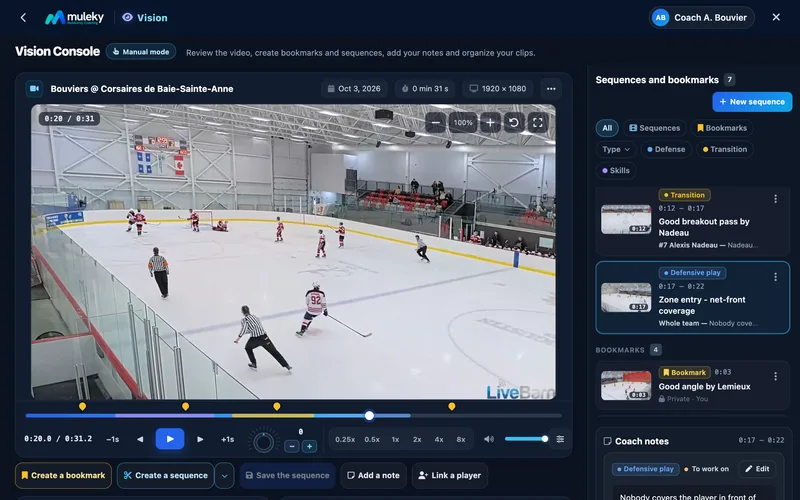
Video review in the Muleky console: a real game filmed from a distance, paused, the timeline with the coach's sequences and bookmarks, and their list with thumbnails and notes (examples)
Real game filmed from a distance

Video first

The player takes all the room, the controls stay at hand. Slow down to a quarter speed, rewind, step frame by frame, zoom in on a corner of the rink or go full screen to review it with the team.
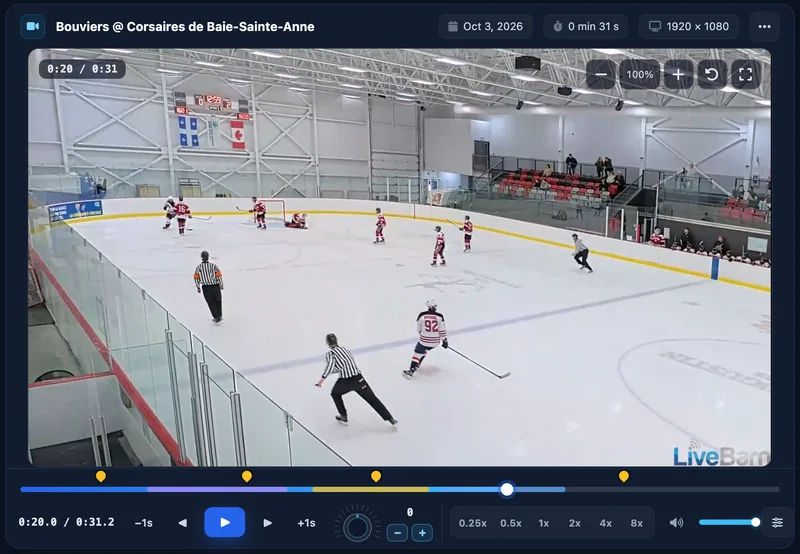
  • Speeds from 0.25× to 8×, and reverse playback
  • Frame by frame, one-second jumps, magnifier
  • Full screen with one key (F), controls that fade away
  • Keyboard shortcuts to do everything without the mouse
Close-up of the video review: a real game, the timeline where each sequence has its colored band and each bookmark its pin, and the controls (slow motion, frame by frame)
Real game filmed from a distance

Bookmarks on the key moments

A goal, a faceoff, a good breakout: press W and the moment is marked, without stopping the video. A discreet bubble lets you name it or undo it. Each bookmark has its thumbnail and its marker on the timeline: one click and you are there.
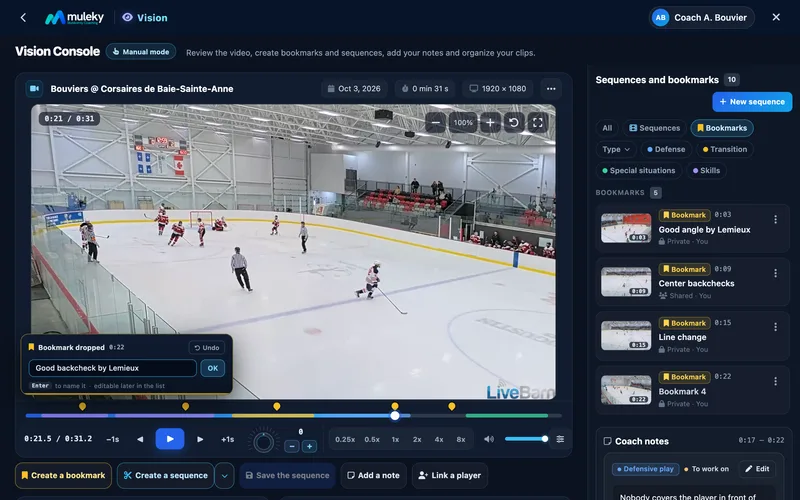
  • A bookmark with one key (W), the video keeps playing
  • Name or undo right away, no blocking window
  • Thumbnail taken from the video and clickable marker
Adding a bookmark on a real game: a discreet bubble confirms it and lets the coach name it without stopping; on the right, the bookmark list with thumbnails (examples)
Real game filmed from a distance

Sequences clipped on the fly

Press E at the start of the play, E at the end: the sequence records like a camera, with its timer and its range drawn on the timeline. Adjust the start or the end, loop it, then play all your sequences back to back.
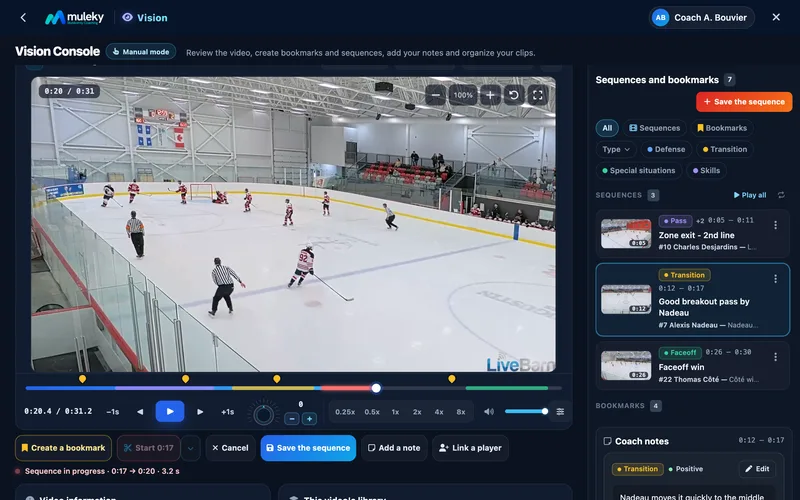
  • Start and end with one key (E), or the last few seconds at once
  • Start here, end here: adjust the bounds on the frame
  • Loop playback and "Play all" to chain them
  • Private or shared with your assistants
Creating a sequence on a real game: the start is set, the range in progress lights up in red on the timeline and "Save sequence" keeps it (examples)
Real game filmed from a distance

Your notes, tied to the play

On a sequence, write what you see, say who is involved (one player, several, or the whole team), choose the category and the type of observation. The sequence card takes the color of its category: you find what needs work at a glance.
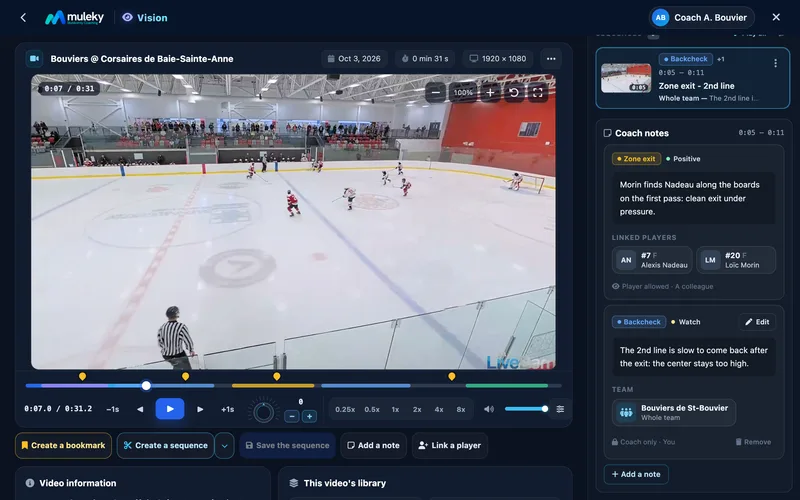
  • Strength, to watch or to work on
  • Skating, zone exits, transition, special teams and other categories
  • One player, several players or the whole team
  • Visible to the coach only, by default
Coach's notes on a sequence from a real game: a positive point linked to two players and a point to watch for the whole team (fictional Bouviers de St-Bouvier team, notes shown as examples)
Real game filmed from a distance

One game, one fixed price

During the trial, video breakdown of your games is included, with no tokens: upload the video, then playback, bookmarks, sequences, action tags and notes are unlimited. After that, video is part of your program's custom agreement, for one team or for the whole club.

  • Breakdown included during the trial, with no tokens
  • Unlimited re-cutting of every video
  • Video for a whole club: by agreement

Frequently asked questions

Which videos can I upload?
Your game video, filmed from the stands or downloaded from a rink streaming service. You drop it on the game page, in the Video tab.
What is the difference between a bookmark and a sequence?
A bookmark marks one precise moment of the game, like a goal or a faceoff. A sequence is a clip, with a start and an end, that you can loop or chain with the others.
Do my assistants see my sequences and notes?
A sequence stays private until you share it; once shared, your team's assistants see it. Notes are visible to the coach only, by default.
Does video review use tokens?
No. Breaking down your games is included during the trial, with no tokens: uploading, playback, bookmarks, sequences, action tags and notes cost nothing. After that, video is part of your program's custom agreement. See the Sign up page.
Does it work on a tablet?
Yes. The console adapts to computer, tablet and phone; on the phone, the note editor opens under the video so it never hides it. The keyboard remains the fastest way to drop bookmarks and sequences.

Your whole season starts here

Create your account and add your team: practices, evaluations, lineups, games and parent communication, all ready in one place.

2-month trial, everything included, no credit card required