Skip to content

AI video analysis In development

AI video analysis, built for minor hockey

Upload your game video: the Muleky analysis server looks for the puck, tracks the players, reads the jersey numbers and places the play on the rink. It is in development, and we say so plainly. You always have the final say.

Not yet offered in the app: the analysis does not produce stats yet.

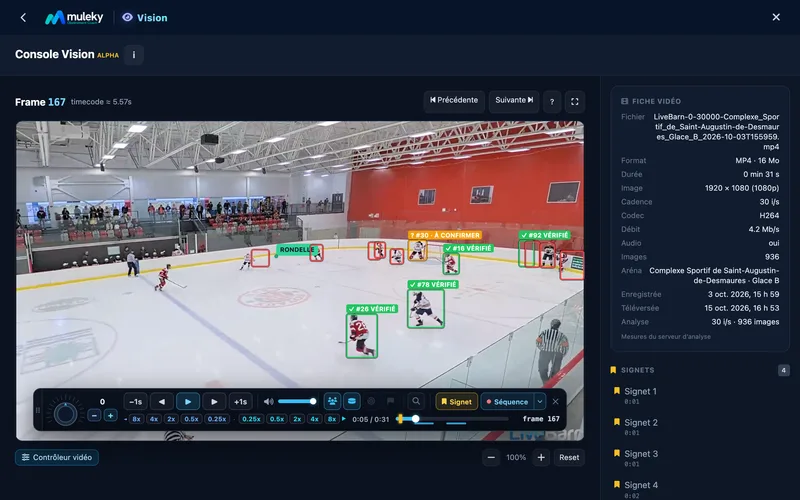
Muleky Vision console paused on a real game filmed from a distance: tracked players in their boxes, verified jersey numbers (shown as examples), one number to confirm, the detected puck and the control bar
Real game filmed from a distance

Where we stand

What the AI is learning to see

Four analyses, all in development. Once offered, you will check the ones you want to launch in the game's Video tab.

In development

Puck

The puck position, searched frame by frame across the whole video.

In development

Players

Every player detected, then tracked over time. Their movements are shown over the video, in the Vision Console.

In development

Jersey numbers

Numbers read on the tracked players, then reviewed by you. Our rule: zero false identities. When in doubt, the AI holds back.

In development

Rink and zones

A guided rink calibration, centre ice first, then the zones, to place players and puck in each zone.

How it works

From video to console, nothing to install

Here is how the analysis will work. No powerful computer at the rink, no software to install: everything happens in Muleky, in your browser.

  1. Upload the video

    Import the video in the game's Video tab and check what the analysis should look for.

  2. The analysis server wakes up

    A server with a graphics card starts on its own, works stage by stage, then shuts down on its own when it is done.

  3. You follow every stage

    The timeline shows where the analysis stands, with its log. Pause it, resume it or cancel it whenever you want.

  4. You open the Vision Console

    Players, numbers and puck are shown over the video, which you review in slow motion or frame by frame.
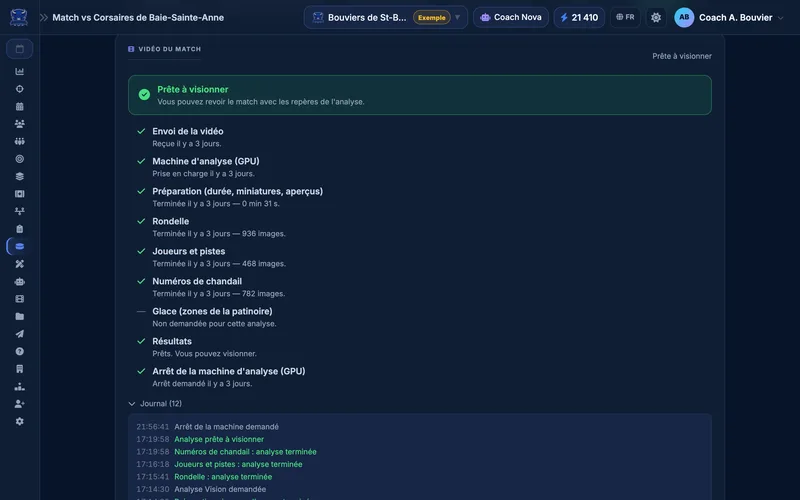
Video tab of an analyzed game: the stage-by-stage timeline, from the video upload to the analysis machine shutdown, and the time-stamped log
Real game filmed from a distance

Human in the loop

You stay in control

The AI suggests, you decide. Everything that involves your players goes past your eyes before it counts.
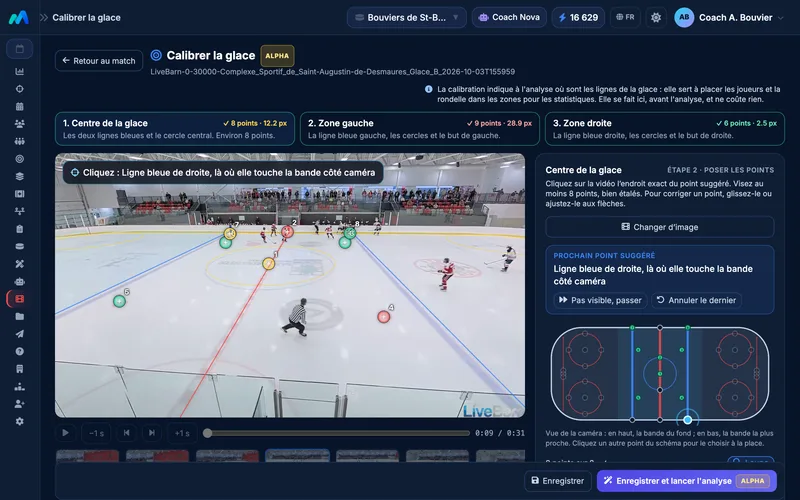
  • The rink is calibrated in a few clicks: Muleky suggests the points, you adjust them.
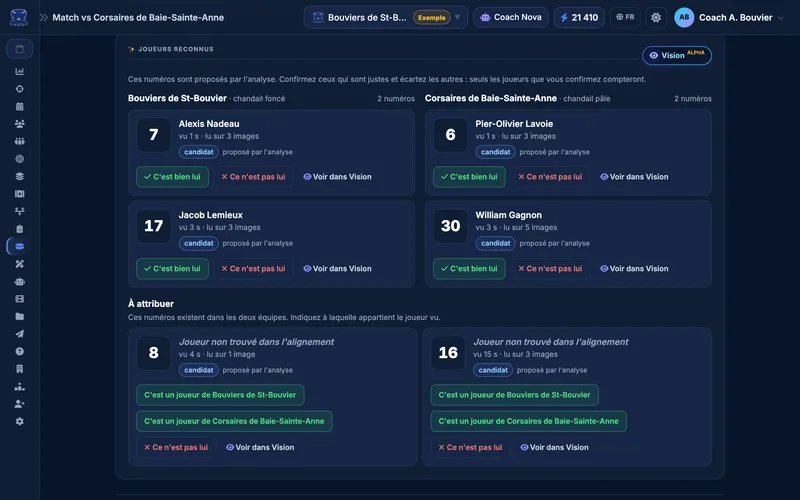
  • The numbers read are suggested to you, to confirm or dismiss: no identity is confirmed without you.
  • Bookmarks and sequences with one key (W and E), just like in video review.
  • Zero false identities: a rule measured on blind tests, on videos never seen before.
Rink calibration: on a frame from a real game filmed from a distance, points placed on the blue lines, the red line and the center circle, matched on the rink diagram
Recognized players after analyzing a real game: each number read is matched to the lineup (fictional Bouviers de St-Bouvier team and its opponent) and the coach confirms or dismisses each suggestion
Real game filmed from a distance

What's coming

What comes next, in order

First, help you record your stats on the video, then speed up every step. No date promised: each capability ships once it has been measured on real games and judged reliable.

  1. Assisted stats on the video

    Record shots, zone entries and exits, and shifts while you watch the video. Every shot time-stamped and placed on the rink, with the shooter suggested from your lineup.

  2. Identities confirmed in minutes

    Players grouped by team and by number, to confirm in one click and link to the players in your lineup.

  3. Clips suggested by detection

    The moments that matter, spotted for you, so you can review a game without watching all of it.

What it costs

You pay for the work actually done

Video upload and review are included in the paid plans. The analysis is paid in tokens, only when you launch it.
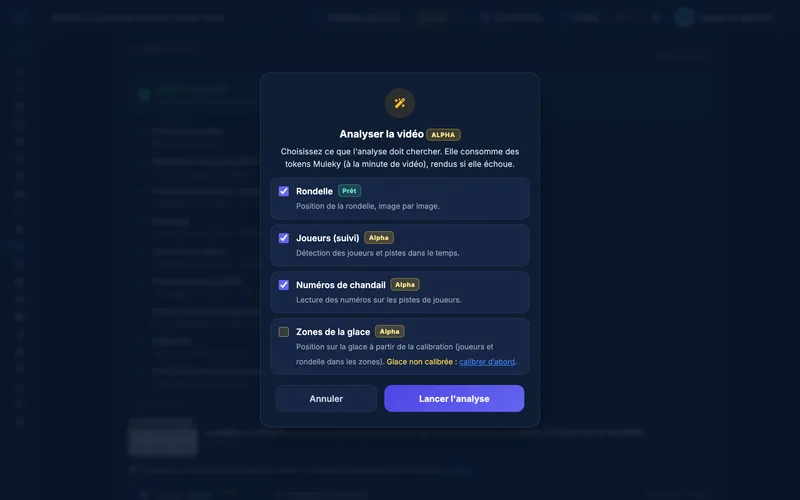
  • You check what the analysis looks for: puck, players, numbers, zones
  • Tokens per minute of video, with the estimate shown before you launch
  • Analysis cancelled or failed: your tokens are refunded
  • The analysis server shuts down on its own: no machine runs for nothing
Pricing
Analysis options: before launching the analysis of a real game, the coach checks what it should look for - puck (Ready), players, jersey numbers and rink zones (Alpha)
Real game filmed from a distance

Questions about video analysis

Is AI video analysis ready?
Not yet. It is in development and not yet offered in the app. It does not produce stats yet. Video review, on the other hand, is ready: upload, slow motion, frame by frame, bookmarks and sequences. To follow a game today, shot tracking from the bench remains the reliable way.
When will it be offered?
We do not promise a date. Each capability will ship once it has been measured on real games and judged reliable.
Can the AI get a player wrong?
It is our number one rule: zero false identities. When the AI is not sure of a number, it holds back instead of guessing, and you are the one who confirms. Our number-reading methods are measured on blind tests, on videos they have never seen.
How much does the analysis cost?
Video upload and review are included in the paid plans. The analysis is paid in tokens, per minute of video: the estimate is shown before you launch, and your tokens are refunded if the analysis fails or if you cancel it. See pricing.
Do I need a powerful computer?
No. The analysis runs on the Muleky analysis server, which has a graphics card. It wakes up when you launch an analysis and shuts down on its own when it is done. You follow everything in your browser.

Start with video, the AI will follow

Video review is ready today, and AI analysis is moving forward step by step, measured as it goes. A question about your videos? Write to us.

30-day Pro trial, no credit card required